macOS Apple Silicon
The signed DMG includes the SwiftUI Studio, CLI, optional Codex skill, and Metal runtime.
- Full app and CLI on Apple Silicon.
- Signed, notarized, versioned DMG.
- Includes the full Studio and CLI workflow.
Pick an install path below, or copy one prompt into your coding agent and let it select the release asset, install, and verify for you.
On Apple Silicon, install the macOS app and CLI. On Linux x86_64, install a release package. On Linux arm64 CUDA, build from source.
The signed DMG includes the SwiftUI Studio, CLI, optional Codex skill, and Metal runtime.
Portable tarball and Debian package for headless x86_64 systems.
Supported source-build target for DGX Spark-class Blackwell CUDA hosts with 128 GB unified memory. The attached release lane is paused.
Copy one prompt into your coding agent. It selects the matching release asset, installs in your home directory, and verifies the CLI. A hardware mismatch stops the install.
use-mere-run skill.You are helping me install mere.run locally on this Mac.
Rules:
- Do not use sudo.
- Do not edit shell profiles unless I ask.
- Prefer user-local install paths.
- Read release metadata from https://mere.run/.well-known/mere-run/release.json.
- Stop and explain if the macOS DMG URL is missing or the DMG mount fails.
Steps:
1. Resolve the macOS DMG URL:
release_json="$(curl -fsSL "https://mere.run/.well-known/mere-run/release.json")"
dmg_url="$(printf '%s' "$release_json" | python3 -c 'import json,sys; data=json.load(sys.stdin); print((data.get("downloads") or {}).get("macos_dmg") or data.get("download_url") or "")')"
test -n "$dmg_url" || { echo "No macOS DMG URL found in release metadata."; exit 1; }
2. Download the DMG to a temporary folder:
work_dir="$(mktemp -d)"
dmg_path="$work_dir/mere-run.dmg"
curl -fL "$dmg_url" -o "$dmg_path"
3. Mount the DMG, or reuse it if it is already mounted:
hdiutil attach -nobrowse -readonly "$dmg_path"
volume=""
for candidate in "/Volumes/mere.run" /Volumes/mere.run* /Volumes/MereRun* "/Volumes/Mere Run"*; do
if [ -d "$candidate" ] && [ -x "$candidate/.mere-run/install.sh" ]; then
volume="$candidate"
break
fi
done
if [ -z "$volume" ]; then
echo "Mounted the DMG, but could not find the mere.run volume."
hdiutil info
exit 1
fi
4. Verify the mounted volume contains MereRun.app plus .mere-run/install.sh:
test -d "$volume/MereRun.app"
test -x "$volume/.mere-run/install.sh"
5. If /Applications/MereRun.app is missing, copy the app there:
if [ ! -d "/Applications/MereRun.app" ]; then
ditto "$volume/MereRun.app" "/Applications/MereRun.app"
else
echo "/Applications/MereRun.app already exists. Leaving it in place."
fi
If the copy is denied, tell me to drag MereRun.app to Applications, then continue with CLI and skill setup.
6. Install the CLI to ~/.local/bin/mere.run:
mkdir -p "$HOME/.local/bin"
MERERUN_INSTALL_BIN_DEST="$HOME/.local/bin/mere.run" "$volume/.mere-run/install.sh"
7. Install the bundled use-mere-run Codex skill if it exists:
skill_source=""
for candidate in "$volume/MereRun.app/Contents/Resources/skills/use-mere-run" "$volume/.mere-run/skills/use-mere-run"; do
if [ -d "$candidate" ]; then
skill_source="$candidate"
break
fi
done
if [ -n "$skill_source" ]; then
mkdir -p "$HOME/.codex/skills"
rm -rf "$HOME/.codex/skills/use-mere-run"
ditto "$skill_source" "$HOME/.codex/skills/use-mere-run"
fi
8. Verify the CLI:
"$HOME/.local/bin/mere.run" --help
"$HOME/.local/bin/mere.run" model capabilities --recommended
9. Pull the starter image model:
"$HOME/.local/bin/mere.run" model pull image-zimage-nano
10. Generate and open the first image:
"$HOME/.local/bin/mere.run" image generate --model image-zimage-nano --prompt "a ceramic mug in soft morning light on a walnut desk" --width 1024 --height 1024 --steps 8 --seed 2026 --output "$HOME/Desktop/mere-first-image.png"
open "$HOME/Desktop/mere-first-image.png"
At the end, tell me where the app, CLI, skill, model store, downloaded DMG, mounted volume, and image are.You are helping me install the mere.run CLI on a Linux x86_64/amd64 host.
Rules:
- Do not use sudo.
- Do not edit shell profiles unless I ask.
- Prefer user-local install paths.
- Read release metadata from https://mere.run/.well-known/mere-run/release.json.
- Stop if this is not an x86_64/amd64 Linux host or if the matching tarball is missing.
Steps:
1. Verify the host architecture:
arch="$(uname -m)"
case "$arch" in
x86_64|amd64) ;;
*) echo "This prompt is for Linux x86_64/amd64, but this host is $arch."; exit 1 ;;
esac
2. Resolve the x86_64 tarball and checksum URLs:
release_json="$(curl -fsSL "https://mere.run/.well-known/mere-run/release.json")"
tar_url="$(printf '%s' "$release_json" | python3 -c 'import json,sys; data=json.load(sys.stdin); print((data.get("downloads") or {}).get("linux_tarball_x86_64") or "")')"
sums_url="$(printf '%s' "$release_json" | python3 -c 'import json,sys; data=json.load(sys.stdin); print((data.get("downloads") or {}).get("sha256sums") or "")')"
test -n "$tar_url" || { echo "No Linux x86_64 tarball found in release metadata."; exit 1; }
3. Download the tarball:
work_dir="$(mktemp -d)"
tar_path="$work_dir/$(basename "$tar_url")"
curl -fL "$tar_url" -o "$tar_path"
if [ -n "$sums_url" ]; then curl -fL "$sums_url" -o "$work_dir/SHA256SUMS"; fi
4. Verify the checksum when SHA256SUMS is available:
if [ -s "$work_dir/SHA256SUMS" ]; then
expected_line="$(grep "$(basename "$tar_path")" "$work_dir/SHA256SUMS" || true)"
test -n "$expected_line" || { echo "SHA256SUMS did not include $(basename "$tar_path")."; exit 1; }
printf '%s\n' "$expected_line" | (cd "$work_dir" && sha256sum -c -)
fi
5. Extract into a user-local versioned directory:
install_root="$HOME/.local/share/mere-run"
version_dir="$install_root/$(date +%Y%m%d-%H%M%S)"
mkdir -p "$version_dir" "$HOME/.local/bin"
tar -xzf "$tar_path" -C "$version_dir"
6. Link the CLI at ~/.local/bin/mere.run:
bin_path="$(find "$version_dir" -type f -name 'mere.run' -perm -111 | head -n 1)"
if [ -z "$bin_path" ]; then
bin_path="$(find "$version_dir" -type f -name 'mere.run' | head -n 1)"
test -n "$bin_path" && chmod +x "$bin_path"
fi
test -x "$bin_path" || { echo "Could not find executable mere.run in $version_dir."; exit 1; }
ln -sf "$bin_path" "$HOME/.local/bin/mere.run"
7. Verify the CLI:
"$HOME/.local/bin/mere.run" --help
"$HOME/.local/bin/mere.run" model capabilities --recommended
At the end, tell me where the CLI, install directory, downloaded tarball, and model store are.You are helping me build the public mere.run CLI from source on a DGX Spark-class NVIDIA Blackwell Linux arm64/aarch64 CUDA host.
Rules:
- Do not claim that v0.43.0 includes an attached arm64 runtime package.
- Do not install system packages or edit shell profiles unless I ask.
- Follow https://docs.mere.run/linux-quickstart and the repository README.
- Stop if this is not an arm64/aarch64 Linux host with CUDA visible.
Steps:
1. Verify the host and CUDA toolchain:
arch="$(uname -m)"
case "$arch" in
arm64|aarch64) ;;
*) echo "This prompt is for Linux arm64/aarch64, but this host is $arch."; exit 1 ;;
esac
command -v nvidia-smi >/dev/null 2>&1 || { echo "nvidia-smi is required for this CUDA source-build target."; exit 1; }
nvidia-smi
2. Confirm Swift 6.x, clang, cmake, ninja, pkg-config, gfortran, ffmpeg, ffprobe, CUDA Toolkit headers, CUDA CCCL headers, cuDNN, and NCCL are available. If any are missing, list them and stop before changing the machine.
3. Clone https://github.com/sawfwair/mere-run into an empty working directory and record the commit.
4. Run the documented Linux gate:
MERERUN_LINUX_ACCEL=cuda MERERUN_SKIP_MLX_CUDA_EXAMPLE=1 ./scripts/check-linux.sh
5. Build the CUDA CLI from source:
MERERUN_LINUX_ACCEL=cuda swift build -c release --product mere.run
6. Verify the resulting binary:
MERERUN_LINUX_ACCEL=cuda .build/release/mere.run --help
MERERUN_LINUX_ACCEL=cuda .build/release/mere.run model capabilities --recommended
At the end, report the source commit, CUDA/toolchain evidence, gate result, binary path, and any validation gap. Do not report this as a released arm64 package.The public Mere CLI finds or installs mere.run, then pulls the models an app declares. It can use an existing binary, build from source, or install a verified release.
mere setup mere-run prepares the runtime.mere setup mere-run models --app media pulls Media's ASR and embedding models.Studio uses the same runtime and model store as the CLI. Check whether a model fits, start a run, watch its progress, and find the outputs on disk.
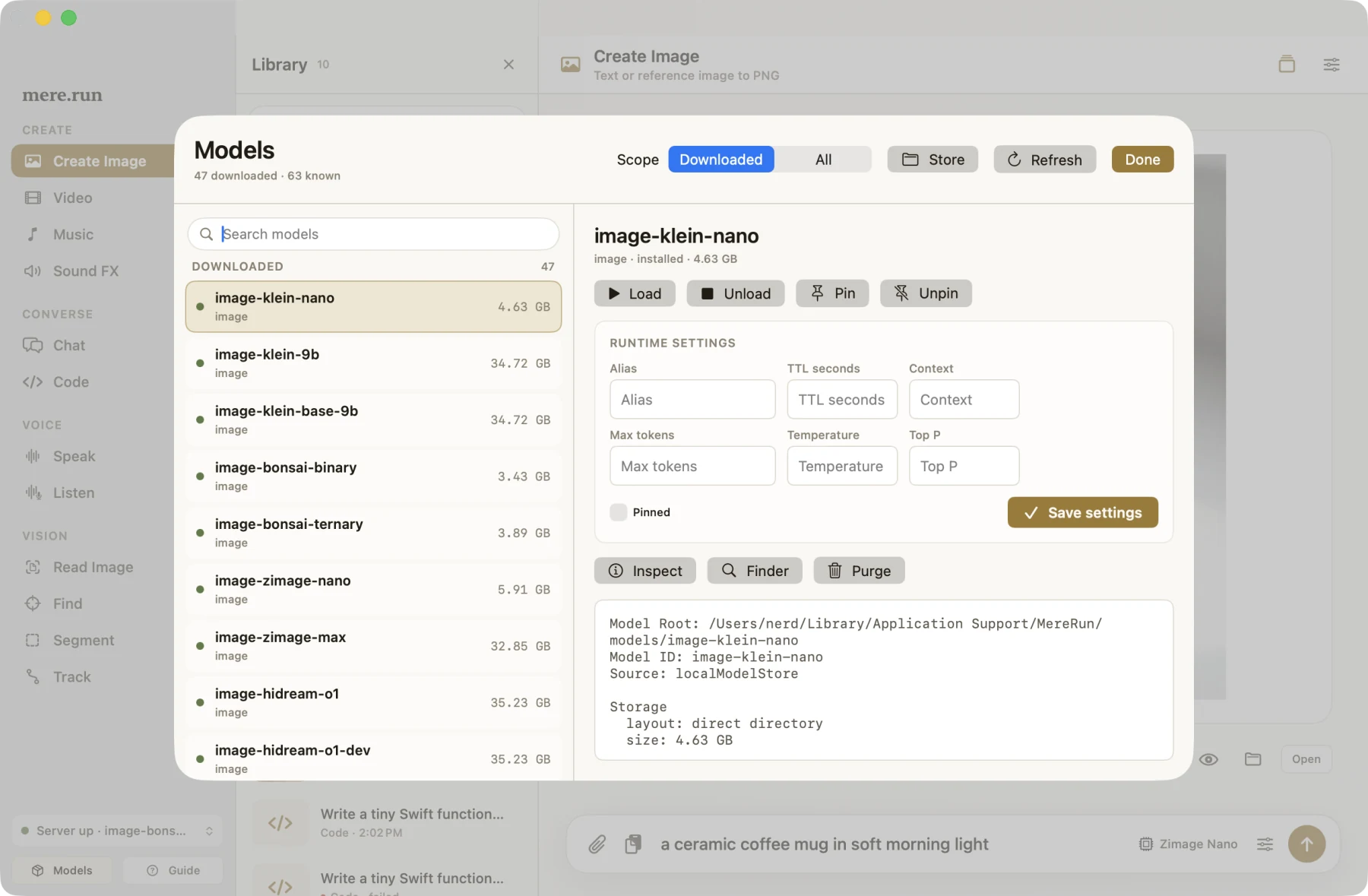
The screenshot shows an earlier macOS Studio build. Studio reads model availability from the same catalog and model store as the CLI.